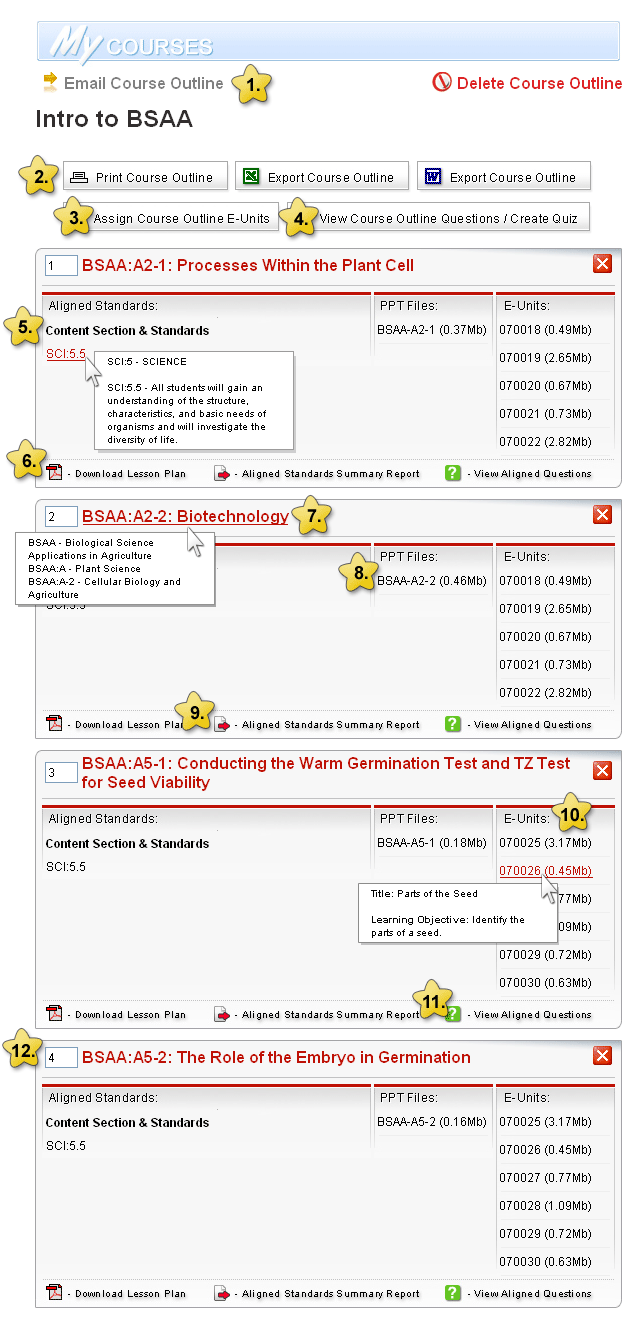
If you create and save a course outline, you may easily share it with another teacher through the "Email Course Outline" link.
Course Outlines may be printed or exported directly to MS Excel or MS Word. The outlines include detailed alignments of lesson plans to academic standards.
View Printer Friendly Course Outline
Each lesson in a course outline has been carefully correlated to an E-Unit. This link enables teachers to assign all E-Units associated with this course outline to select students at the click of a button.
Each lesson within a saved course outline has up to five (5) associated questions. The multiple choice questions have been drafted to test the goals covered in the lesson. This button enables teachers to create a multiple choice exam to test course outline topics. The exam may be created at the click of a button and administered online for students to submit.
This section lists the correlated state standards for each lesson composing the course outline. Mouse over the Standard Code to view a detailed description of each standard.
This link is available for all lessons in the course outline. Click on Download Lesson Plan" to open a PDF version of the lesson plan in a new window.
Mouse over the name of each Lesson Plan in your saved course outline to view detailed Lesson Plan Library information.
Each lesson is correlated to one or more PowerPoint© Student Presentations. Click on the corresponding link(s) to save and view the PowerPoint files.
Click on link to view sample PPT:
Understanding Genetics
Click this link to view a summary report detailing all state standards correlated to the applicable lesson plan.
Each lesson in a course outline is correlated to one or more E-Units. An E-Unit is a concise content unit developed explicitly for ag ed students. Most E-Units are 6 to 8 pages in length and cover a single learning objective. They are designed to look like pages in a traditional textbook.
This link is similar to #4 above. In this case, teachers reserve the right to view questions correlated to just the lesson in question.
Teachers may re-order lessons in a course outline as they see fit.